
Create, manage, and revoke API keys to securely connect your systems to PageTiger
Before the API can be used, an API key must be generated - this key is a secure identifier that allows your system to connect to PageTiger and make authorised requests. Once created, it's important that the key is stored someone safe, as it will be required for every request your system sends.
Creating an API Key
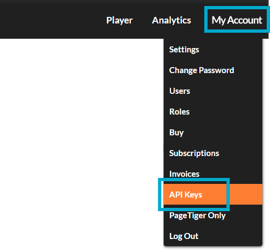
- Select 'My Account', followed by 'API Keys'.
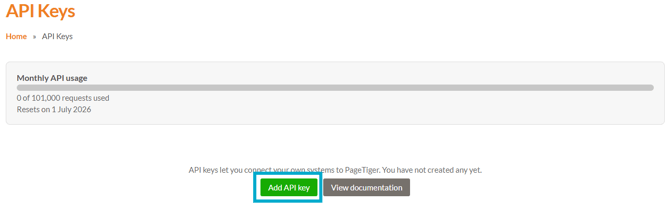
The API Keys page will then display, showing:
-
Monthly API usages
The number of requests made using the API. -
'Add API key' button
Select to create a new API key. -
'View documentation' button
Select to open the PageTiger API documentation.
- Click the 'Add API key' button.
- Enter:
- A name for the key.
- An expiration date.
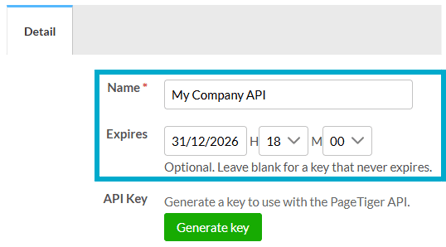
Leave the 'Expires' field blank to create a key that never expires.
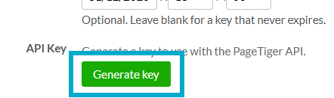
- Click the 'Generate key' button.
A pop-up box will then display your API key.
-
Select 'Copy key' to copy the key, then store it somewhere secure.
-
Once you've safely stored the key, select 'I've saved my key'.
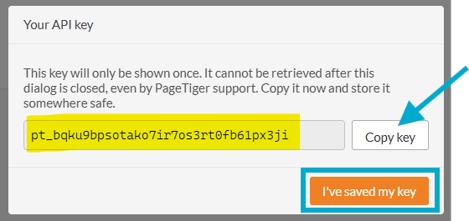
Your API key will only be shown once.
For security reasons, we do not store and cannot retrieve the complete key, so it's essential that you copy and store it securely before selecting 'I've saved my key'.
Once the API key has been generated, a partial version of it will be displayed, where you can:
-
Update the name or expiry date if required.
-
Revoke the key at any time by selecting the ‘Revoke’ button.
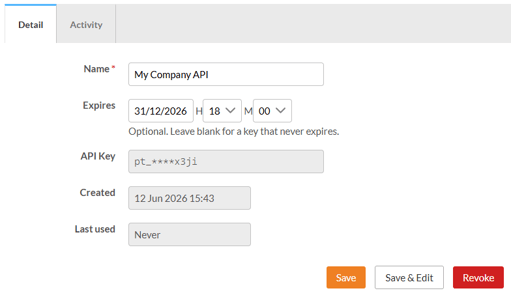
Selecting the 'Revoke' button immediately deactivates the API key. A revoked key will no longer work and will be shown as read-only with a revoked status in the API keys list.
- Select 'Save' to return to the API Keys page.
Managing API keys
All your API keys are listed in a table on the API Keys page. From here, you can:
- Add or edit an API key.
- Filter the list of keys.
- View the API documentation.

API Usage and Limits
At the top of the API Keys page is a usage bar showing your current API consumption.

Monthly API usage allowance is determined by your service plan. Please contact your Customer Success Manager for more information about API tokens and usage limits.
API Documentation
API documentation is a detailed technical reference that explains how the API works and how to use it - it's essential for developers and anyone responsible for integrating with it.
To access the documentation, visit https://api.pagetiger.com/docs