
Overview
You can export the design of any document version from TigerDesigner as a PDF, PNG or JPG file. This works the same way whether you're using Fully Editable or Layout Library.
-
Share on social media
Create images for LinkedIn and other platforms. -
Print with ease
Produce a print-ready version for posters or handouts. -
Keep a record
Save a copy of your design for your files.
How to export your design
-
Open the document version in TigerDesigner.
-
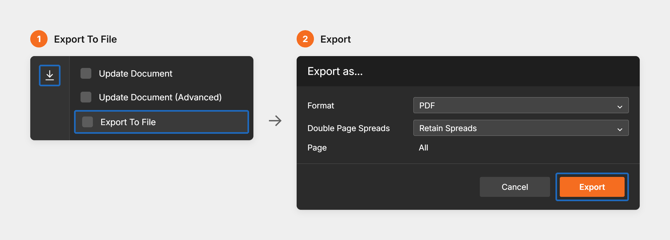
Select the blue arrow in the left-hand menu.
-
Select 'Export to File'.
-
Choose a format: PDF, PNG or JPG.
-
If you chose PDF, choose how to export your spreads:
-
Retain spreads - keeps double-page spreads together.
-
Split spreads - exports each page on its own.
-
-
Select 'Export'.
Exported files include the design only. To use interactive features such as videos, assessments and links, readers need to view the online version.