
Get a real-time notification whenever someone subscribes to or unsubscribes from one of your Expected Visitor Lists (EVLs). It’s a simple way to see who is opening your content, how often it’s being viewed, and when a version is attracting attention, without needing to check analytics manually.
Why it's useful
-
Welcome people quickly: Follow up with new subscribers while your content is still fresh in their minds.
-
Spot drop-off early: A run of unsubscribes after a mailing can show that the content, frequency or timing needs a rethink.
-
Keep your lists accurate: Know straight away when someone opts out, so they aren't contacted through other channels.
-
Track growth: See how sign-ups respond to campaigns, events or new content.
How to add a notification to an Expected Visitor List (EVL)
Navigate to the Expected Visitor List that you would like to add the notification to.
-
Select ‘Documents’, followed by 'Settings’ from the main menu.
-
Select 'Expected Vistors'.
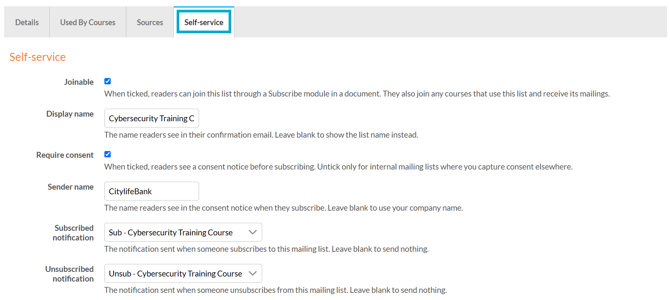
- Add or edit an existing EVL, and select the 'Self-service' tab.
Two notifications are available
-
Subscribed notification
The notification is sent when someone subscribes to the list. -
Unsubscribe notification
The notification is sent when someone unsubscribes from the list.
What happens next?
You'll now get a real-time notification each time someone subscribes to or unsubscribes from the list, so you can stay up to date with changes as they happen. This gives you a clear view of who is joining, who is opting out, and when activity on the list might need your attention.