
New
-
Security rule page improvements
-
-
Login methods (Basic Login, Reader Login, Employee Number, SSO and LMS) are now selected from a single 'Login type' choice on the 'Details' tab, with the relevant settings shown alongside.
-
Advanced options such as 'IP Address', 'Referral URL', 'Badge' and 'Expected Visitor Lists' remain on their own tabs and can still be combined.
-
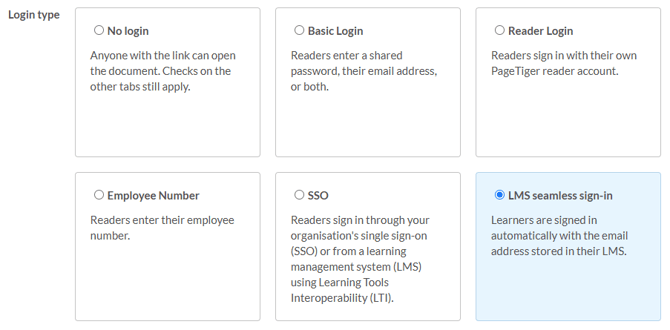
Explore the latest changes in the Security Rules section.
-
Seamless Reader login from an LMS
-
A new LMS login type allows learners opening a SCORM document from their LMS to be signed in automatically using the email address held by the LMS, with no login screen.
-
A Reader account is created on first use, and the email is passed securely within the SCORM launch.
-
This option is available on documents restricted to LMS launch, and Email Restrictions can still be used to control who has access.
-
SSO support for SCORM documents
-
Learners launching an SSO-protected SCORM document from an LMS now have a smoother sign-in experience.
-
Where a learner isn’t already signed in, a Sign in button opens their organisation’s sign-in page in a popup and returns them straight to the course.
-
Learners who already access documents seamlessly will see no change.
-
-
SCORM progress resume
-
Learners returning to a SCORM document from their LMS can now pick up where they left off, with completion progress and assessment scores restored however the document is secured.
-
Progress is saved within the LMS, and a brief indicator shows while it’s being restored before the learner is offered their last page.
-
This is controlled by a new SCORM resume setting on each document, which is switched on by default.
-
Improvements
-
Changing the mastery score on a document with a downloaded SCORM package now saves all changes on the page as expected once the dialog is confirmed.
- The 'Not visited' view in EVL analytics now displays more clearly when there are no records to show.
- Font styles applied to bold text in More Information modules now display in View as selected in Designer.
- Unsupported WebP files are now flagged when added to a More Information module, making it clear which images can be used.
- Replacing a branding logo now updates every logo panel, not just Components.