Documents created using the 'Upload a File' option, such as PDFs or PowerPoint files, do not support Modern Accessibility. Instead, Legacy Accessibility can be used to make your content more accessible to visitors using screen readers.
Unlike Modern Accessibility, Legacy mode requires you to manually enter the text you would like a screen reader to read aloud, page by page.
Enabling Legacy Accessibility
- Select 'Manage' for your document from the homepage.
- Select 'Manage Version', followed by 'Version Settings'.
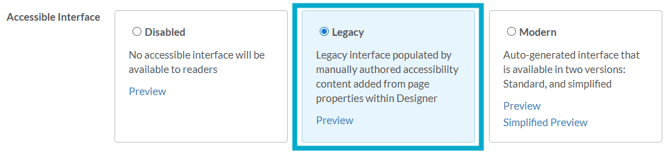
- Scroll down to the Accessible Interface section and select 'Legacy'.
- Save your changes.
Adding accessible content to pages
Once Legacy Accessibility is enabled, you can begin adding accessible content to each page of your document.
- Select the 'Pages' palette from the top right of the page.
- Right-click on a page and select 'Page Properties'.
- Complete the 'Accessibility' section by entering the text you would like the screen reader to read aloud for that page.
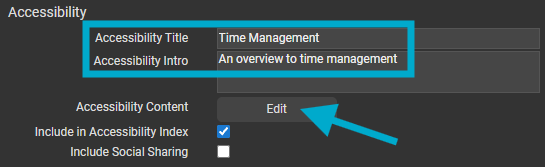
Repeat this process for every page in your document. Take care with the wording you use - think about how the text will sound when read aloud, and ensure it gives a clear and accurate representation of the page content for all visitors.
Adding accessible content to More Information pop-ups
Accessible content can also be added to any More Information pop-up in your document, ensuring visitors using screen readers can access that content too.
- Edit the More Information element on your page.
- Select the 'Accessibility' tab.
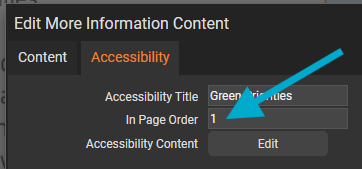
- Enter a title for the element — for example, 'Green Priorities'.
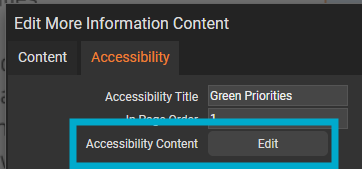
- Select 'Edit' next to 'Accessibility Content'.
- Enter the text you would like the screen reader to read aloud.
More Information pop-up content is read after the page content. If your document contains multiple More Information elements on the same page, you can assign each one an order number to control the sequence in which they are read.