
Instead of relying on standard pass/fail thresholds, 'Advanced Scoring Mode' lets you decide exactly how many points each answer is worth, reflecting the relative importance or complexity of different questions.
'Advanced Scoring Mode' works by manually assigning a score to every answer option within a question. These individual scores are then added together to create a total score, making it easy for you to set more detailed result bands, such as different proficiency levels or personalised feedback messages based on how someone has performed.
How to enable Advanced Scoring Mode
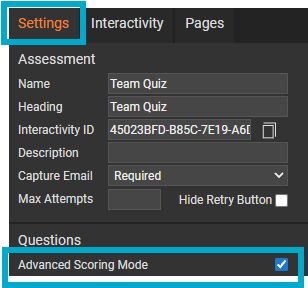
- Add an 'Assessment' module to the page.
- Select the module to enable the 'Settings' palette.
- Tick the 'Advanced Scoring Mode' checkbox.
How to use Advanced Scoring Mode
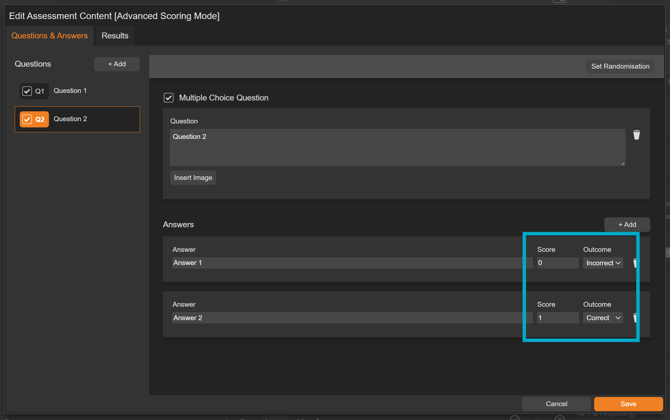
- Edit the assessment module on the page, then work through each question and update each answer.
- Select if the answer is 'Correct' or 'Incorrect'.
- Enter a score for the answer.
Results
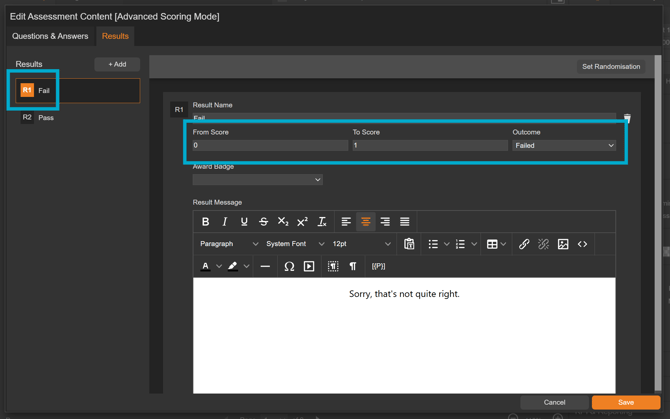
Once you have assigned a score to every answer, select the ‘Results’ tab. By default, two result bands are available: Fail and Pass.
Fail Result
- Enter the score range that will result in a fail. In this example, the fail band is set between 0 and 1.
Pass Result
- Enter the score range that will result in a pass. In this example, the pass band is set at 2.
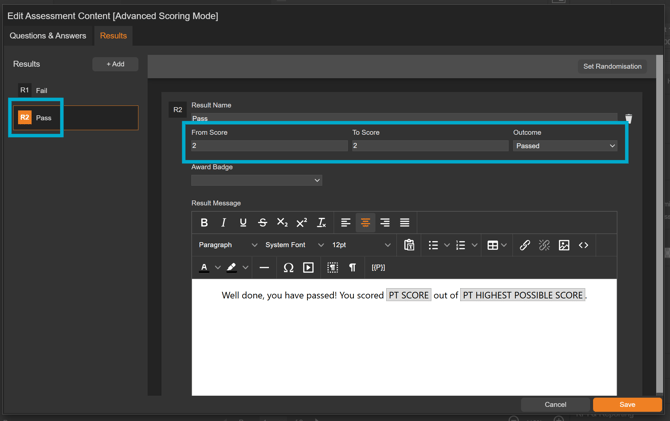
In the above example, there are only two possible total scores: 0 - 1, or 2 - 2.
- A total score of 0 or 1 falls into the Fail band, which indicates that the required standard has not yet been met.
- A score of 2 sits within the Pass band, showing that all required answers were correct.
This simple structure makes it clear how performance is judged and provides a straightforward way to explain outcomes to learners or stakeholders.
You can add additional result bands to suit your needs. By tailoring outcomes to different score ranges, your assessment can reflect varying levels of knowledge, confidence, or understanding, making it easier for people to see where they stand. This also helps highlight key strengths and clear opportunities for improvement.