
- The AI generator can be used multiple times within the same assessment, allowing you to separate different requests and create a wide variety of questions.
- Adding more questions can give a more comprehensive evaluation of understanding, while fewer questions are ideal for quick knowledge checks or keeping users engaged without overwhelming them.
The AI generator allows you to create a large pool of questions much more quickly. You can then apply the ‘Set Randomisation’ option so that each time the assessment is viewed, a different selection of questions appears, making it more challenging for learners.
- More answer choices can increase the challenge and reduce the likelihood of guessing correctly, while fewer options keep questions simpler and faster to complete.
Example
Lucy's ‘Conflict Management’ document contains five sections. She wants to include a short assessment after each one, so chooses:
-
‘Up to 3’ questions to help to keep each assessment focused.
-
‘Up to 6’ answers per question to reduce the likelihood of learners guessing correctly by elimination.
- Using the full document allows for a more varied assessment, while focusing on a single page is useful for testing knowledge on a specific section or topic. The more context the AI has to work with (for example, the entire document rather than a single page), the more likely it is to generate higher-quality questions.
Example
Jamie adds an assessment to each section in his ‘Data Privacy’ document to check his team’s understanding of the specific topic. He also includes a final assessment on the last page of the document to test overall knowledge, reinforce retention across multiple topics, and encourage staff to make connections between the sections.
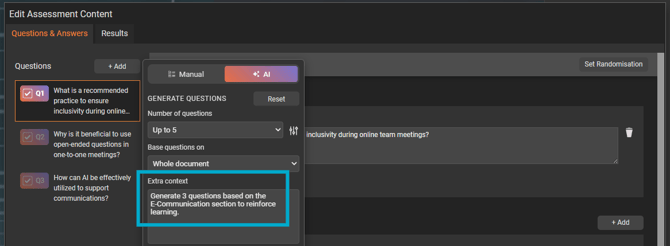
- Use the 'Extra Context' field to provide the AI generator with specific focus or requirements to ensure your assessment questions are aligned with your goals.
Example
In Steve’s 'Communicating Online' document, he asks the AI to generate three questions based on the ‘E-communications’ section, to help reinforce key learning in an area that staff have recently needed additional support.
- A more professional tone (set by default) is often best for formal topics such as compliance training, where clarity and seriousness are important. In contrast, a more inspiring or engaging tone can make assessments feel more approachable, which works well for informal learning or light-hearted workplace quizzes.
- Easier questions are great for reinforcing basic understanding or onboarding, while more difficult questions can test deeper knowledge and critical thinking.
Example
Jennifer chooses a 'professional' tone with a 'hard' level of difficulty to test her staff on their company GDPR policy, reflecting the seriousness and legal importance of the topic. She wants to be confident that employees can apply the policy correctly in real situations, and not just recognise key terms.