Once a QR Code has been generated for a document or version, it can be downloaded as an .SVG file and used across both digital and printed materials. How and where you use it can make a big difference, turning a simple scan into a convenient, engaging way for people to access your content. Used well, a QR Code can help connect offline and online experiences, and encourage interaction.
-
Bridge printed and digital content, turning a poster, leaflet or handout into an interactive experience.
-
Remove friction for the reader - no typing URLs, just scan and go.
-
Work anywhere - emails, packaging, signage, ID badges, presentations and more.
-
Stay valid even if the content changes, so there's no need to reprint materials.
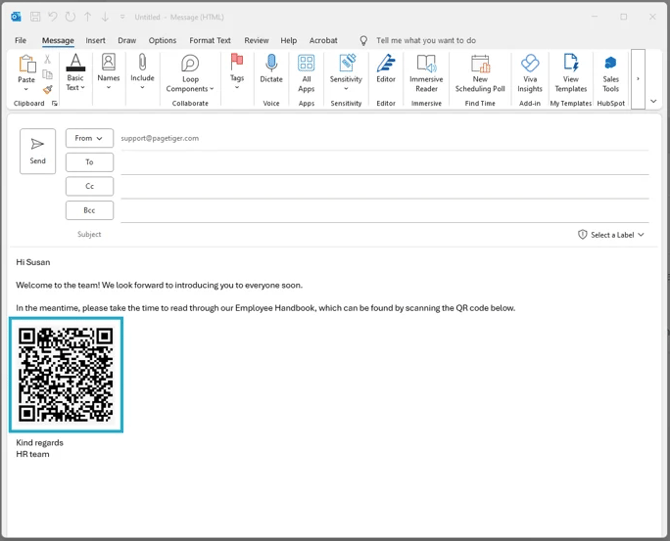
Example 1: In an email
Encourage engagement and make it easier for employees to access important information by including a QR Code in an email. Position the QR Code prominently to capture attention, and consider adding a call-to-action, such as "Scan the QR Code to access the latest employee handbook".
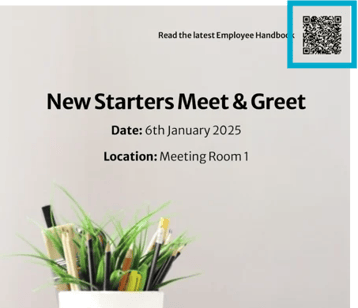
Example 2: In a poster
Enhance office communication and provide employees with instant access to relevant documents by including a QR Code in a poster. Place the poster in high-traffic areas to maximise visibility, and encourage engagement and interaction in the workplace.