
The design of a document version can be exported from TigerDesigner as a PDF, PNG, or JPG file, enabling you to save a copy to use outside of PageTiger.
-
Create images to use on LinkedIn or other platforms.
- Create a print-ready version for posters or handouts.
- Keep a hardcopy of the design for your records.
-
Open the document version in TigerDesigner.
-
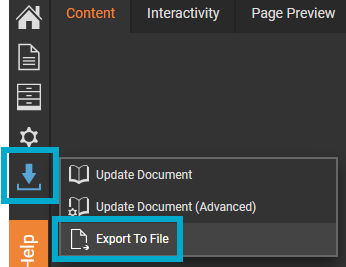
Select the blue arrow from the left-hand menu.
-
Select 'Export to File'.
-
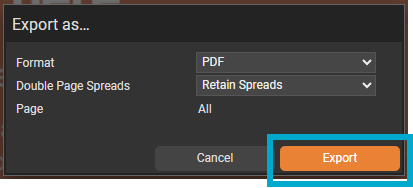
Select the format that you would like to export your design to. Choose from:
-
PDF
-
PNG
-
JPG
-
- Select the 'Export' button.
Selecting PDF will give you the option to export as double ('retain spreads') or single page spreads ('split spreads').
The exported file will include the static design only and will not contain any interactive functionality. To use interactive elements, viewers will need to access the online version with an active internet connection.