
Overview
SSO is a security rule login type that lets visitors sign in with your organisation's single sign-on. They use their existing work login, so there's no separate PageTiger account or password to remember.
Readers can also sign in from a learning management system (LMS) using Learning Tools Interoperability (LTI).
- One login for everything
Visitors use the same work login they use every day. - Secure by design
Access is managed by your organisation, so when someone leaves, their access goes too. - Know who's reading
Every visit is linked to a verified work identity, giving you accurate analytics.
Before you start
SSO needs setting up for your account before you can use it in a security rule. Our Support team will work with your IT team to configure it. Learn more about SSO for viewing documents.
How to create a SSO rule
Once your SSO configuration is complete, ask our Support team to share it with your account. When it's available:
- Set up the rule details. Learn more here.
Once the rule details have been completed, the login type can be selected and set up.
- Select the 'SSO' option.
- Select the configuration from the 'Single Sign-On' drop-down.
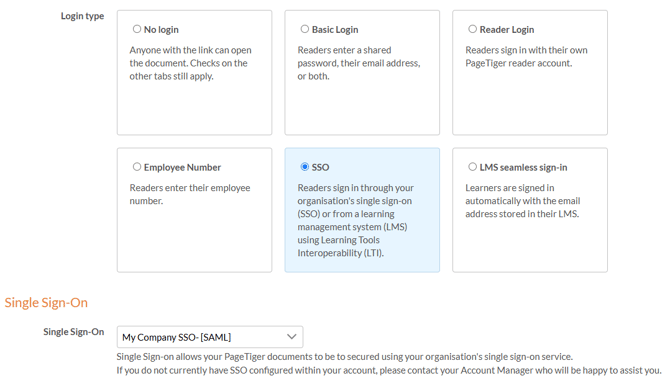
- Select 'Save', or 'Save & Edit' to save and keep working on the rule.
- Add an Expected Visitor List
For extra control, only let in a pre-approved group of people. See Expected Visitor Lists. - Unlock content with Badges
Use Badges to guide visitors through documents in order. See Advanced options: Badge. - Good to know
Visitors are logged out after 60 minutes of inactivity. See Session timeout warning.