
Overview
A Parent Account sits at the top of your PageTiger setup. Like any PageTiger account, it lets you create, secure, distribute and track documents.
It can also have Child Accounts beneath it, so different teams or departments can work in their own space while you keep things consistent from the top.
What the Account Owner can do
The Parent Account's Account Owner can:
-
Manage users across the Parent Account.
-
Access subscription details.
-
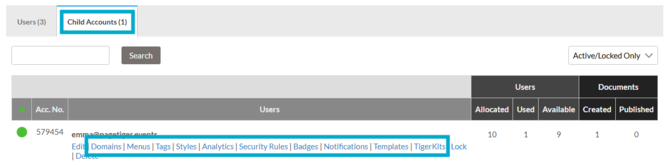
Share templates and settings with Child Accounts, so every team starts from the same approved content and setup.
- Select 'My Account' > 'Users'.
- Select the 'Child Accounts' tab.
- Select a category, then choose the item to share.
-
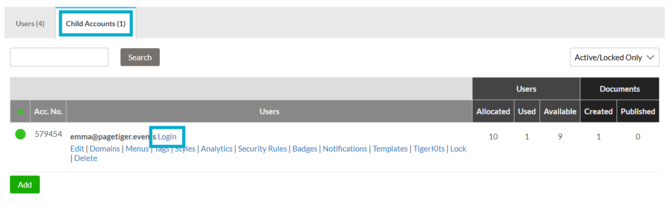
Impersonate Child Accounts, with exactly the same access and permissions as that account's user. This makes it easy to see what they see and help with any setup questions.
- Select 'My Account' > 'Users'.
- Select the 'Child Accounts' tab.
- Select 'Login' for the Child Account that you wish to impersonate.
Good to know
Settings in a Child account take priority over the roles assigned to its users. If an option is switched off in the Child account's settings, users won't see it, even if their role allows it.
Find out more on the Child Accounts page.