
All PageTiger admin users must be assigned a role, which defines what they can do in your account. Assigning clear roles helps you maintain security, and ensure each person has the right level of access to perform their responsibilities effectively.
If you are interested in creating roles that reflect your organisation’s structure and permissions, visit our page about custom roles.
Available Roles
There are five pre-defined roles available to all Essentials, Essentials Plus, and Enterprise customers. These roles provide a clear set of permissions for common use cases, so you can quickly assign the right level of access without having to configure settings from scratch.
| Account Owner | 'Account Owners' inherit all permissions granted to the Full Access role, and can also manage users and view or update subscription details. For Parent accounts with Child accounts, Account Owners can share templates and settings across accounts and impersonate Child accounts, giving them equivalent access as if they were logged in as that user. |
| Full Access | 'Full Access' users can create, manage, and publish documents. They can also use TigerMailer and TigerGenius, and access analytics for the entire account. This role does not include any account management permissions. |
| Analytics Only | 'Analytics Only' users can view document analytics within their account but cannot create or manage documents. |
| Analytics Only - Single Folder | 'Analytics Only - Single Folder' users can view analytics for documents created within a single specified folder in the account. They cannot create or manage documents. |
| TigerGenius + Analytics | 'TigerGenius + Analytics users' can create documents using TigerGenius and access analytics for those documents. |
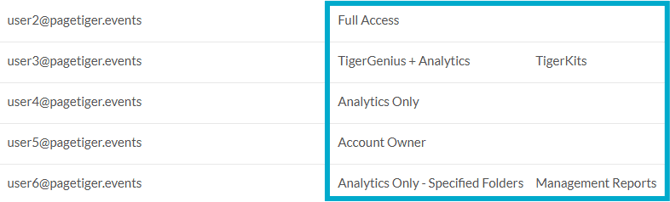
Given the extensive level of access the Account Owner role provides, it should only be assigned to a small number of trusted individuals.