
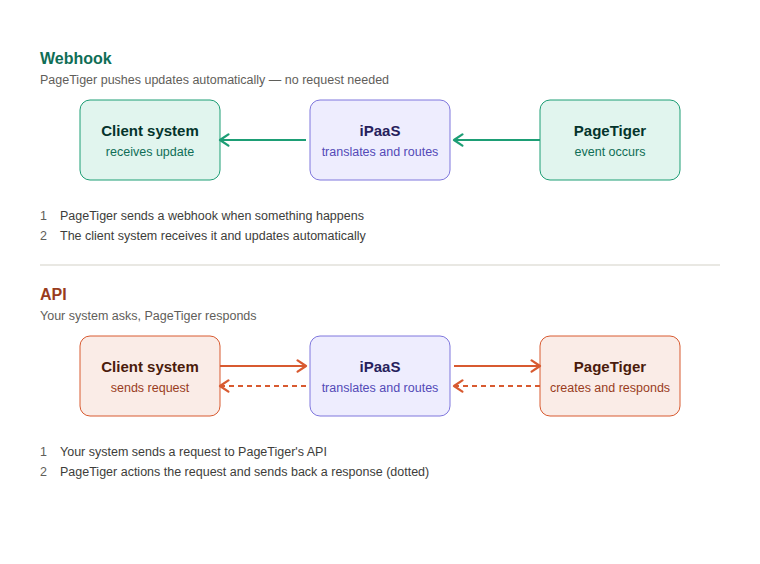
Whether you use a webhook or API depends entirely on what you're trying to achieve. If you want PageTiger to let your system know when something's happened, you'll use a webhook. If you want your system to ask PageTiger for something, you'll use the API.
Webhooks and APIs - what's the difference?
If you're connecting PageTiger to another system, you'll usually come across two terms: API and webhook. They're related, but work in opposite directions.
What's a webhook?
A webhook tells your system when something has happened - like a reader completing an assessment. You don't have to keep checking; PageTiger sends the update the moment it happens.
What's an API?
An API works in the opposite direction. Rather than PageTiger telling your system when something has happened, your system asks PageTiger for something. For example, if you want to create a document from a template, search for one, or retrieve a list of folders, your system sends a request to the PageTiger API. PageTiger then returns the information or carries out the action - your system stays in control, because it decides when to make the request.
A simple way to remember it:
Webhook
PageTiger posts a note through your system's door delivering new information the moment it's available so your system can act on it.
API
Your system knocks on PageTiger's door, asks a question, and PageTiger responds.
Do I need anything extra to make either of these work?
Often, yes. Whether your system is receiving updates from PageTiger via a webhook, or asking PageTiger for something via the API, something usually needs to sit in between to handle and translate that information so your system understands it. This is called a connector (sometimes referred to as an iPaaS), and is normally set up by your IT team or the other platform's provider.
What is an iPaaS?
An iPaaS (Integration Platform as a Service) helps different software systems "talk" to each other, even if they don't normally speak the same language.
Think of it like ordering food in an Italian restaurant when you only speak English – you'd need a translator sitting between you and the waiter so you can both understand each other.
An iPaaS works the same way for software: it sits between two systems, translating and passing information back and forth so they can work together smoothly.
Example scenario
Ben is the Recruitment Manager for CitylifeBank, and has sent Steph a job offer pack. He needs to know when she accepts the role so a personalised onboarding pack can be created, and then have their system updated once it's been read. This is a great use case for demonstrating how webhooks and APIs work together, each doing a different job.
-
Offer accepted (webhook)
The job offer pack sent to Steph has a webhook set up that notifies CitylifeBank's CRM the moment she accepts the role. -
Onboarding document created (API)
As soon as their CRM is updated, CitylifeBank uses PageTiger's API to request a new document for Steph, built from the Onboarding template. This is a direct request - their system asks, and PageTiger responds by creating the document. -
Onboarding completed (webhook)
Once Steph reads and completes the onboarding document, PageTiger sends a notification back to CitylifeBank's CRM using a webhook. This tells their system the document is complete, and they can mark Steph as fully onboarded.
Why this matters
The API handles the "make something happen" step, while the webhook handles the "let me know when it's done" step - together, they create a fully automated onboarding journey, from document creation right through to completion tracking.