
Overview
Basic Login is a security rule that adds a login screen in front of your document. You can set it up to:
-
Ask for a password
Only visitors who know the password can open the document. -
Capture an email address
Visitors enter their email before viewing, so you can see who's reading in your analytics. -
Do both
Combine a password with email capture for an extra layer of control.
-
Quick to set up
One rule, a few fields, and your document is protected. -
Flexible
Choose password, email capture or both to suit each document. -
Better reporting
Captured email addresses show who's engaging with your content. -
On-brand login screen
Show your document cover and add help text so visitors know exactly what to do.
How to create a Basic Login rule
-
Set up the rule details. Learn more here.
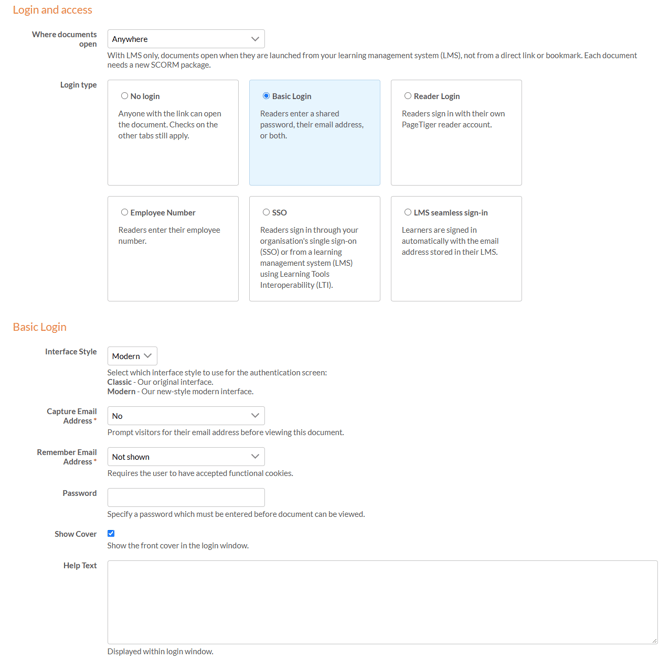
Once the rule details have been completed, the login type can be selected and set up.
-
Select the 'Basic Login' option.
-
Choose an 'Interface Style':
- Modern (Recommended)
A polished login screen with the best visitor experience. - Classic
Legacy login screen.
- Modern (Recommended)
-
To capture email addresses, choose 'Required' or 'Optional' from the 'Capture Email Address' drop-down. Leave it set to 'No' for a password-only login.
-
Choose a 'Remember Email Address' option to save visitors from re-entering their email on future visits. This only works for visitors who have accepted functional cookies.
-
To add a password, enter it in the 'Password' field. Leave it blank for an email-only login.
-
'Show Cover' is selected by default and displays your document cover on the login screen. Clear the checkbox to hide it.
-
'Add Help Text' to guide visitors through the login screen.
-
Select 'Save', or 'Save & Edit' to save and keep working on the rule.
-
Share passwords securely
Visitors need the password to get in, so send it through a secure channel - ideally separately from the document link. -
Email addresses aren't verified
Visitors can enter any address in a valid format, so captured data may not always be accurate. For verified visitors, use a Reader Login security rule instead. -
'Optional' email capture
Use this option when you'd like to collect addresses without putting anyone off opening the document.