
If you have created a course in PageTiger, 'Course Analytics' provides a clear view of learner engagement and progress in real time. Use it to monitor completion rates, review badge activity, and identify where learners may need additional support.
View course performance directly in PageTiger or download the data for more detailed analysis and reporting.
How to view course analytics
-
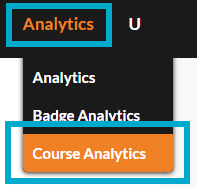
Select 'Analytics' from the main menu, followed by 'Course Analytics'.
Two ways to view:
On-page
See progress, completion rates, and badge status at a glance, and filter as needed.
-
Select 'View' on a course to see a table of enrolled users, their completion %, and earned badges.
-
Click a user for their individual progress, or a badge to see completion analytics for it.
-
Names included in an Expected Visitor List pull through automatically.
Download
Export a spreadsheet for offline review or reporting.
-
Tick the course(s), choose data type (Awarded/Unawarded/Expired Badges), then hit Download.
-
Includes badge name, visitor email, award status, and award/expiry date.
-
From a course's 'View' screen, get a full spreadsheet covering visitor email, visitor list, completion %, and enrolled courses with award dates.
For full details, see the complete Course Analytics guide.