
The 'Subscribe' module isn't just for newsletters - it's one of the easiest ways to get readers straight onto a course. Instead of sending them off to a separate sign-up form or adding them manually, they enrol with a few clicks, right there in the document they're already reading.
-
Removes friction
Readers subscribe and start their learning journey in one place. -
No manual admin
Enrolment onto the course expected visitor list happens automatically the moment someone subscribes. -
Keeps momentum going
Readers move straight to "enrolled" while their attention's still with you.
How to use the Subscribe module with Courses
-
Add the module to a document
Add a 'Subscribe' module to a PageTiger document - for example, a course introduction or promo page, so readers can enrol as soon as they've decided to sign up.
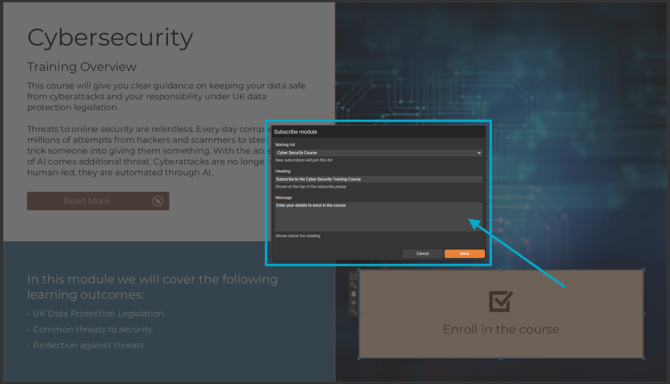
Make sure this document uses the same security rule as the course the reader is enrolling in. This should be Reader Login, SSO, or Employee Number.
- Tell readers what happens next
Once someone subscribes, give them a clear next step rather than leaving them to guess. Add a 'More Information' pop-up box or page in the document that displays after subscribing, covering:- What happens next now they've enrolled (e.g. when they'll get access, what to expect).
- A link to the course landing page, so they know exactly where to go to get started.
This creates a seamless transition from sign-up to the course, so readers know what to do next.
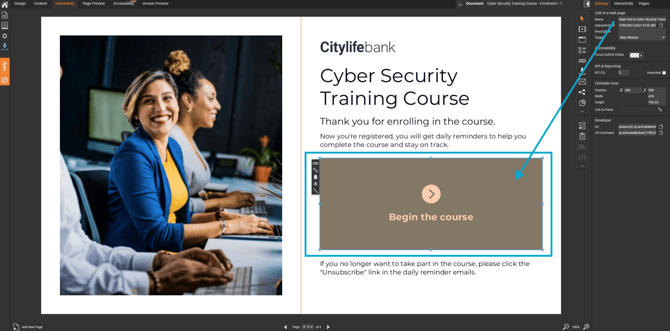
If Course Notifications are enabled, enrolled readers will also receive a reminder email encouraging them to complete the course.