
Overview
LMS seamless sign-in is a security rule login type for documents opened from your learning management system (LMS). Learners are signed in automatically with the email address stored in their LMS, so they go straight to the content.
-
No extra login
Learners move from your LMS to the document in one click. -
Accurate reporting
Activity is linked to each learner's LMS email address. -
Flexible access control
Allow or block individuals and whole domains.
How to create a LMS seamless sign-in rule
- Set up the rule details. Learn more here.
Once the rule details have been completed, the login type can be selected and set up.
-
Select the 'LMS seamless sign-in' option.
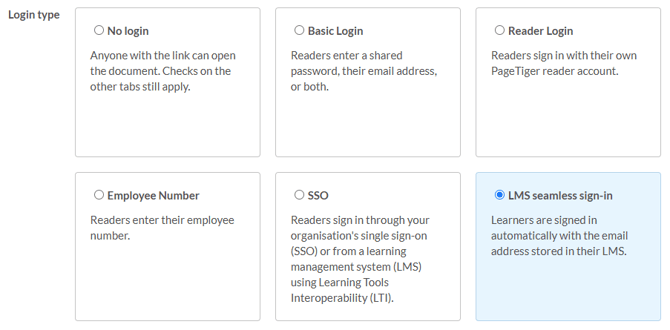
-
Add any checks you need on the other tabs, such as IP Address or Referral URL.
-
To limit access, add email addresses to 'Restrict by email address'.
-
To block access, add email addresses to 'Deny by email address'.
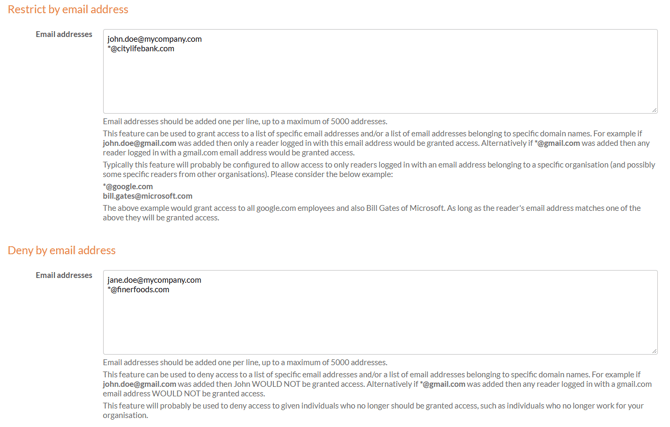
'Restrict by email address' and 'Deny by email address' work the same way:
- One entry per line
Add each email address or domain on its own line. - Individual readers
Enter a full email address, such as john.doe@mycompany.com. - Whole domains
Enter an asterisk followed by the domain, such as *@mycompany.com, to include everyone with that email domain.
- Select Save, or Save & Edit to save and keep working on the rule.
- Name rules after their audience
Include the domain or group in the rule name, such as 'Reader Login (*@yourcompany.com)', so it's easy to find later. - Add extra checks
Use the the other tabs, such as IP Address or Expected Visitors for extra control. - Start with your domain
Adding *@yourcompany.com to 'Restrict by email address' is a quick way to keep documents within your organisation.