Q. How do I generate a dynamic SCORM package?
Navigate to a document and select the 'LMS' tab.
Q. What is a Mastery Score?
The mastery score is the overall SCORM pass threshold (between 0 and 100). It can also be left blank if you would like the completion to be when the learner reaches the final page.
Q. Can I change the mastery score after uploading a dynamic SCORM package to my LMS?
Yes! The mastery score can be updated at any time without re-generating the dynamic SCORM package. The new value will be reflected automatically the next time the activity is launched.
Q. I don't need or want to use an assessment in my document. How can I indicate completion in my course activity instead?
When generating a dynamic SCORM package, leave the mastery score field blank, which will mark completion when the learner reaches the final page.
Q. What is the Assessment Status section for under the LMS tab?
The Assessment Status section summarises all assessments in your document. It shows the page they appear on, whether they are mandatory, and their pass and maximum scores. The total score for mandatory assessments and effective mastery score is also listed here.
Q. Can I restrict a SCORM package so it only works through an LMS?
Yes. For added security, a SCORM package can be restricted to work through an LMS only. To enable this setting, create or edit a security rule and select the 'LMS-only access' checkbox. When the security rule is added to the document and someone tries to access the document directly they will see a Page Not Found message instead of the content.
Q. How do I add or upload a dynamic SCORM package to my LMS?
You will first need to create a new course in your LMS (or edit an existing one). Once done, a new SCORM activity can be added, and the dynamic SCORM package uploaded.
How you create a course and add a SCORM activity can vary depending on your LMS platform - please refer to your LMS user guide for guidance specific to your system.
Q: Does a dynamic SCORM package contain the actual PageTiger document?
A dynamic SCORM package doesn’t include the actual document itself. It is a container file that contains a small launcher page that tells the LMS to display the PageTiger document inside an iFrame.
Q. Is the content hosted on my LMS?
The content will always remain hosted on PageTiger, whilst your LMS shows a window into our platform.
Q. Are dynamic SCORM files cloud based?
The file will tell your LMS course to iFrame the PageTiger document. The content does not sit inside your LMS.
Q. Does a dynamic SCORM package secure my PageTiger document?
The dynamic SCORM standard has no concept of authentication or security, so will not secure your document. Apply a PageTiger security rule, such as Reader Login, to your document if you wish to enforce security.
Q. Do visitors need to log in to my LMS separately when I use dynamic SCORM?
If a document uses an Employee Number security rule, PageTiger can automatically provision a Reader Account using the unique identify that your LMS has on file (for example - Client ID or Employee no.). This means readers won't be asked to log in separately, and the document will open straight away, using the details passed from your LMS. Contact our support team if you wish to discuss this option.
Q. Will my assessment results be passed into my LMS?
Yes, the score for all assessments will be passed into your LMS.
Q. Will my LMS capture all of the analytics from my PageTiger document?
Page views and assessment scores will be passed into your LMS.
PageTiger will report individual answers for each question of your assessment to the LMS - how this is handled may vary depending on your LMS platform.
Q. If I make changes to my document, will I need to generate a new dynamic SCORM package?
No! Our dynamic SCORM package is dynamic and always serves the latest published version in a document. The updates are in real-time, so you won't need to re-generate a new file. Instead, make sure you follow best practice and create a new version of your document when you need to make changes.
Q. Can I secure my PageTiger document with a security rule and still use dynamic SCORM?
Yes. However, because dynamic SCORM packages do not natively support Single Sign-On (SSO), we recommend securing your document with either password protection or reader login.
Q. Will my document remember what my reader has completed and which page they reached?
Yes, this is possible! To make sure the document remembers where a reader got to, you'll need to do two things:
-
Apply a Reader Login security rule to the document
-
Make sure 'Remember Previous Interactions' is ticked in the Style applied to it.
Once in place, the document will keep track of which page the reader reached, and any mandatory modules they've completed (so they won't be prompted to do them again). It's worth noting that your LMS will record activity regardless - including who viewed the document, how far they got, and any assessment results.
The LMS and the document itself do two different jobs - the LMS captures the data, but if 'Remember Previous Interactions' isn't enabled in the document, the reader will be presented with the document from the beginning every time they open it and will need to repeat anything they've already done.
Q. What happens if I generate a SCORM package for a document that has version translations?
A SCORM file is generated at document level, so when a document has version translations, the SCORM package will open the native version by default. Visitors can select 'Other Languages' from the toolbar to view any of the available translations.
Example
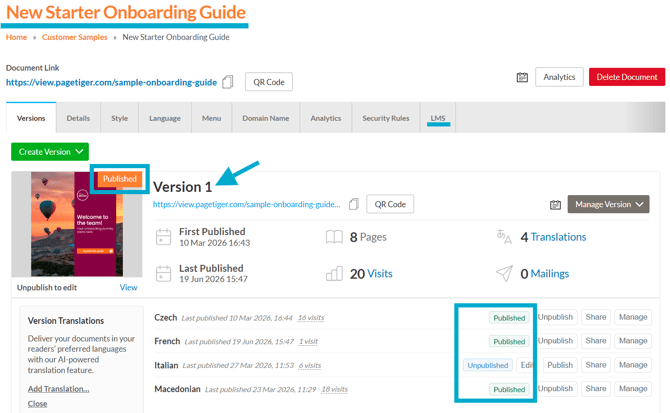
The 'New Starter Onboarding Guide' currently has one published version ("Version 1"), which also includes four translations.
When the SCORM package is launched, it will open Version 1 by default, and readers can switch to any of the available published translations using the 'Other Languages' option in the toolbar.
Q. Can I generate a SCORM package for a specific translated version of a document?
A SCORM file is generated at document level, so if a document has version translations, the SCORM package will open the native version by default. Any translations can be accessed using the 'Other Languages' option in the toolbar.
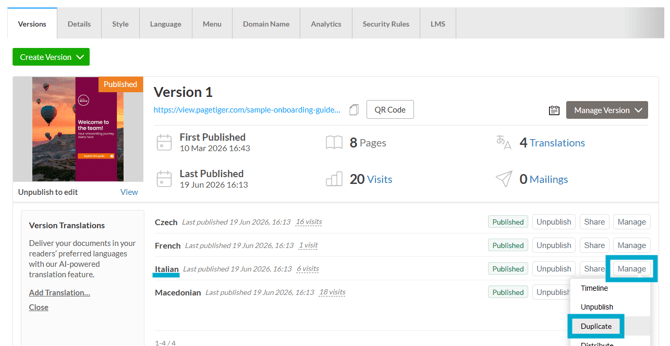
If you need to SCORM package a specific translated version, it can be duplicated and saved in its own document. To do this, select 'Manage' for the translated version, followed by 'Duplicate', then choose the document you would like to save it in.
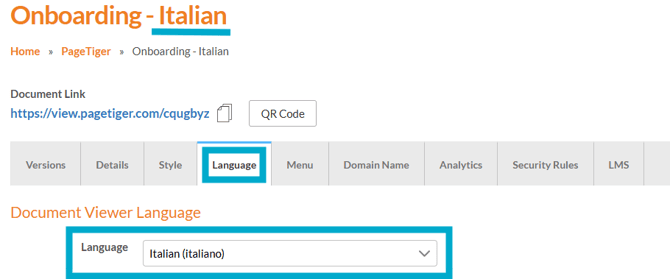
Remember to select the 'Language' tab for the new document and set the native language.