Over time, updates may be needed to your documents - whether it's changes in terminology, rewrites, or amendments to key information such as policies or manuals. When making updates, it’s important to follow the correct process, and be mindful of how changes will impact any translated versions.
This page provides best practices for updating your content, helping to keep information accurate, up to date, and consistent across all translations.
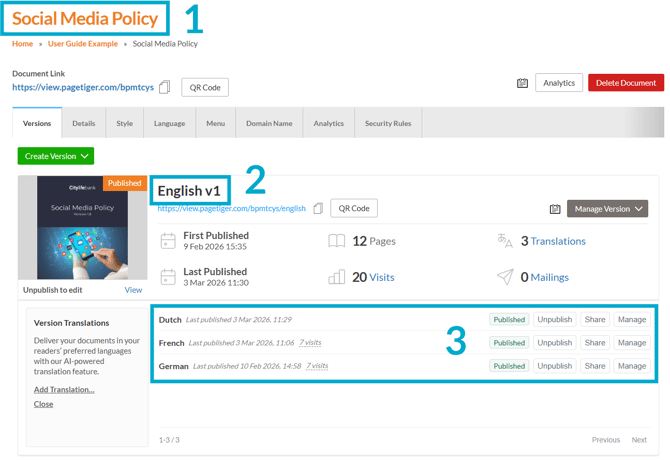
In this example, we'll be looking at a Social Media Policy (1), that currently has one version (2) and three translations (3).
Option 1 - larger changes
Step 1 - Create a new native version of your document
-
Navigate to the native version of your document.
-
Select 'Manage Version', followed by 'Duplicate'.
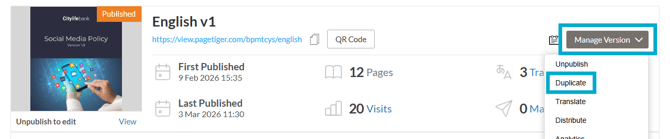
It's important to create/save the new version in the same document to ensure it uses the same document link and settings.
- Once the new version has been created, you can make any changes as needed.
- Don't forget to export and publish when you're ready!
Step 2 - Create any required translations
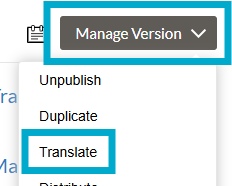
- Once you are happy with the changes, you can begin creating the required translated versions using 'Manage Version', followed by 'Translate'.
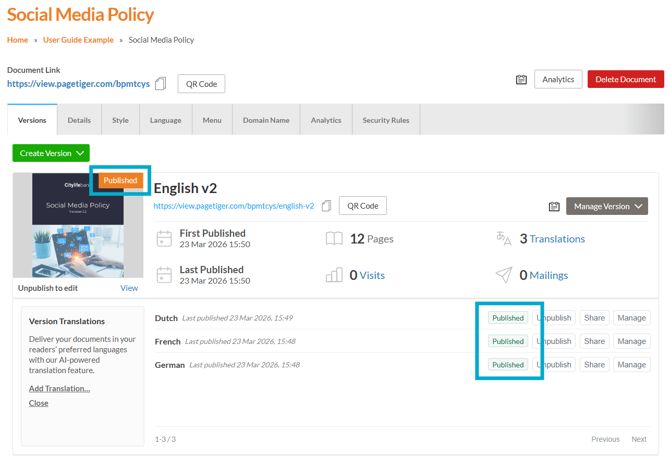
Step 3 (optional) - Unpublish the previous native version and its translated versions
- If you no longer want the previous version of your document (or any of its translated version) to be available, it's important that they are unpublished.
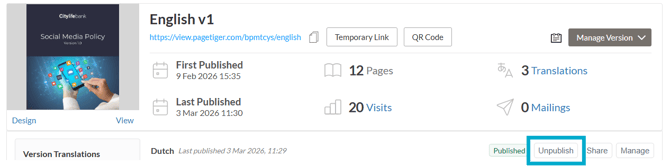
- Select 'Manage Version' followed by 'Unpublish' for the version you wish to unpublish.

- Select 'Translations' followed by 'Unpublish' for any translated versions you wish to unpublish.
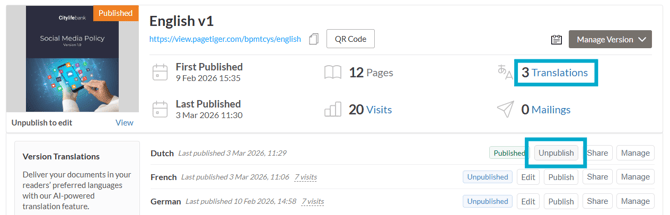
To make this process more efficient, use the bulk publish or unpublish options. Select ‘Manage Version’, then choose either ‘Publish’ or ‘Unpublish’.
- You may also want to adjust the toolbar settings in the Style applied to your document, deselecting the ‘Other Version’ option.
Why is this step optional? There may be some instances where you do want the previous versions of a document to be available - for example, if you are creating another version of a newsletter (e.g. Version 2 = the February issue).
Option 2 - smaller changes
If you need to make a small change, for example correcting a typo or altering a few words, you may prefer to unpublish the native version (and any translations) and make the changes manually.
Don't forget to republish once finished!