
Set your pages to turn automatically and control how auto turn works for your readers. These settings let you decide when automatic page turning begins, how often pages turn, and whether videos should finish playing before the document moves on.
This can be useful in a reception area, waiting room or customer display space. Choose a page-turn interval that gives viewers enough time to read each page.
Enable Attract Mode
Tick this box if you would like your document to automatically page turn after a period of user inacitivty.
Start After
You can choose how long the period of inactivity must be before the document turns a page automatically.
Choose from the drop down a time that ranges from 30 seconds to 30 minutes. 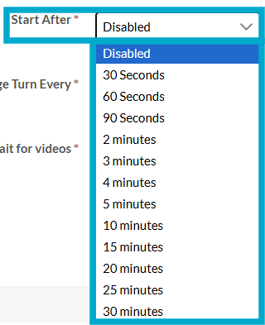
Page Turn Every
The period of time between each automatic page turn.
Choose from the drop down a time that ranges from 10 seconds to 5 minutes.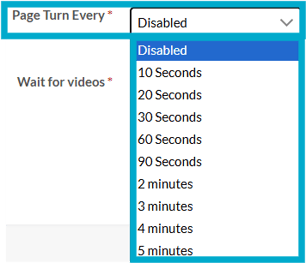
Wait for videos
Tick this box to delay automatic page turning until any videos have finished playing.
These guides may also help:
- Style Settings: Document Size
- Style Settings: Toolbar
- Style Settings: Pop ups
- Style Settings: Background
- Style Settings: Chart Settings
- Style Settings: Page Turn
- Style Settings: Used By
You can see a video walkthrough on creating Custom Styles in the PageTiger Learn Centre -> Training | Custom Styles